![logo-1.png]](https://help.appmiral.com/hs-fs/hubfs/logo-1.png?height=34&name=logo-1.png)
1. App Review Process Summary — Apple vs. Google Play
🍎 Apple Store Review:
Apple’s review process is known for being thorough, manual, and policy-strict.
How it works:
- After we submit your app through App Store Connect, it enters “Waiting for Review”.
- A human reviewer checks your app for:
- Technical stability and performance
- Compliance with Apple’s App Store Review Guidelines
- Accurate and complete metadata (screenshots, descriptions, links, etc.)
- Proper handling of privacy, permissions, and data collection
- Alignment with platform expectations (UI, user experience, content)
Typical timelines:
- Most reviews take 1–3 days, but it can vary.
- Complex apps or apps with policy red flags may take longer.
- Expedited review can be requested in rare cases—but approval is not guaranteed.
Outcome:
- Approved: App becomes ready for release.
- Rejected: Apple provides feedback; you must fix issues and resubmit.
- Metadata rejected: Often faster to resolve (no new binary required).
🤖 Google Play Review
Google uses a hybrid system—automated scanning plus human reviewers.
How it works:
- We submit your app in the Google Play Console.
- Google performs:
- Automated checks for malware, security vulnerabilities, and policy violations
- Human review, especially for new developers or sensitive content
- Google focuses heavily on:
- Privacy disclosures
- App functionality
- Accurate store listing information
- Compliance with Google Play policies
Typical timelines:
- Reviews generally take a few hours to 3 days.
- First-time developers may experience longer review times, sometimes up to a week.
- High-risk categories (e.g., kids’ apps, financial apps) may also take longer.
Outcome:
- Approved: App can be published or staged for rollout.
- Rejected: Google provides policy reasons and guidance for resubmission.
- Warnings: You may receive notices about content or metadata needing updates.
🛠 2. Complete Your Testing Checklist
Before going live, review the Test Application Checklist we’ve provided.
It clearly explains:
- Which items require an app update
- Which items you can change yourself through the CMS
Please resolve all items requiring an app update before we submit—this prevents users from needing to download another forced update shortly after launch.
During submission, we may need to hide or adjust content that could lead to rejection, such as:
- Violent, adult, or sensitive content
- Inappropriate language
- Empty or broken links
- Cards or menu items linking to webpages with cookies enabled
- Any placeholder or incomplete content
Please review all areas of the CMS before requesting submission:
- Newsfeed
- Pages
- Partners
- Playlists
- Artist or talent profiles
- Any text, images, or media that may violate guidelines
‼️ Content issues can cause app rejection, While some sensitive content may be tolerated if it’s non-explicit, it’s important to avoid adding anything that could be considered nudity or explicit—even if it’s meant to be humorous or harmless. Apple and Google use strict, US-based content standards, and violations can lead to your app being removed from the store without the possibility of reinstatement, even after it has already passed review. We’ve seen this happen before, so staying compliant is essential.
Need more details? Explore these full guides to Apple and Google’s review guidelines.
📝 3. Add Your App Store Description in the CMS
Once you have access to the CMS:
- Add your final App Store description (in all applicable languages) to the Project Status page.
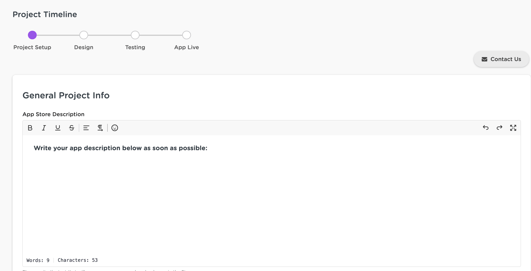
This content is required so we can build your store listing.
Updating your store description later requires a new app submission—so please make sure what you provide is final.
📱 4. Provide App Screenshots (If You Have Preferences)
Screenshots are a key part of your app’s store presence.
If you want us to use specific screenshots:
- Send them to your Customer Success Manager before you request app submission.
Changing screenshots after submission requires another app update— only send final versions.
✔ 5. Keep Your Developer Accounts Up to Date (Apple & Google)
To keep your submission on track, your team is responsible for maintaining your developer accounts.
Here’s what to double-check regularly:
- Pending agreements
- Updated terms & conditions
- Notifications requiring approval
👉 Apple frequently updates its membership agreements, and only the account owner can accept them.
👉 Apple has two separate environments—the Developer Portal and App Store Connect: Both must be checked regularly for any required agreements or updates. While you may receive notifications about expiring certificates, Appmiral handles certificate renewals, so no action is needed on their side for that.
We cannot submit your app if anything is pending, so be sure both accounts are fully updated before requesting submission.
📣 6. Push Notifications Go Live After Your App Does
Push notifications are set up during publishing and can only be tested once the apps are live in stores.
Device testing becomes available as soon as the public version is released.
📅 7. Avoid Launching on Fridays, Weekends & Holidays
To ensure we’re available to support you during launch:
- Avoid going live when support availability is limited.
This ensures we can help quickly with any urgent issues.
🤝 Shared Responsibility = Smooth Launch
We’re excited to help bring your app to the world!
If you’re unsure about anything—or want a second set of eyes—your Customer Success Manager is always here to help.
Let’s launch with confidence. 🚀